TL;DR: vLLM on AMD ROCm now has better FP8 performance!
- What’s new? PTPC-FP8 quantization is now supported in vLLM (v0.7.3+) on AMD ROCm.
- Why is it good? You get speeds similar to other FP8 methods, but with accuracy much closer to the original (BF16) model quality. It’s the best FP8 option for ROCm.
- How to use it:
- Install ROCm.
- Get the latest vLLM (v0.7.3 or newer).
- Add the
--quantization ptpc_fp8flag when running your Hugging Face model. No need to pre-quantize!
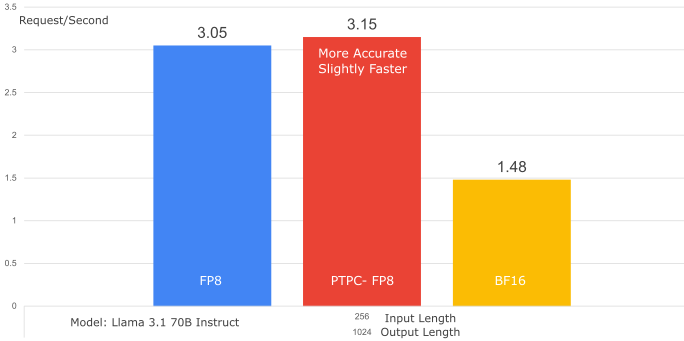
What is PTPC-FP8? It’s a method for FP8 weights and activations quantization. It uses per-token scaling for activations and per-channel scaling for weights, giving you better accuracy than traditional per-tensor FP8.
Introduction
Large Language Models (LLMs) are revolutionizing how we interact with technology, but their immense computational demands can be a barrier. What if you could run these powerful models faster and more efficiently on your AMD GPUs, without sacrificing accuracy? Now you can! This post introduces a breakthrough: PTPC-FP8 quantization in vLLM, optimized for AMD’s ROCm platform. Get ready for near-BF16 accuracy at FP8 speeds, directly using Hugging Face models – no pre-quantization needed! We’ll show you how it works, benchmark its performance, and get you started.
The Challenge of LLM Quantization and the PTPC-FP8 Solution
Running large language models is computationally expensive. FP8 (8-bit floating-point) offers a compelling solution by reducing memory footprint and accelerating matrix multiplications, but traditional quantization approaches face a critical challenge with LLMs.
The Outlier Problem
LLMs develop activation outliers as they scale beyond certain sizes. These unusually large values create significant quantization challenges:
- Most values receive few effective bits of precision when using per-tensor quantization
- Outliers appear persistently in specific channels across different tokens
- While weights are relatively uniform and easy to quantize, activations are not
PTPC: A Precision-Targeted Approach
PTPC-FP8 (Per-Token-Activation, Per-Channel-Weight FP8) addresses this challenge by using tailored scaling factors based on three key observations:
- Outliers consistently appear in the same channels
- Channel magnitudes within a token vary widely
- The same channel’s magnitude across different tokens remains relatively stable
This insight led to a dual-granularity approach:
- Per-Token Activation Quantization: Each input token receives its own scaling factor
- Per-Channel Weight Quantization: Each weight column gets a unique scaling factor
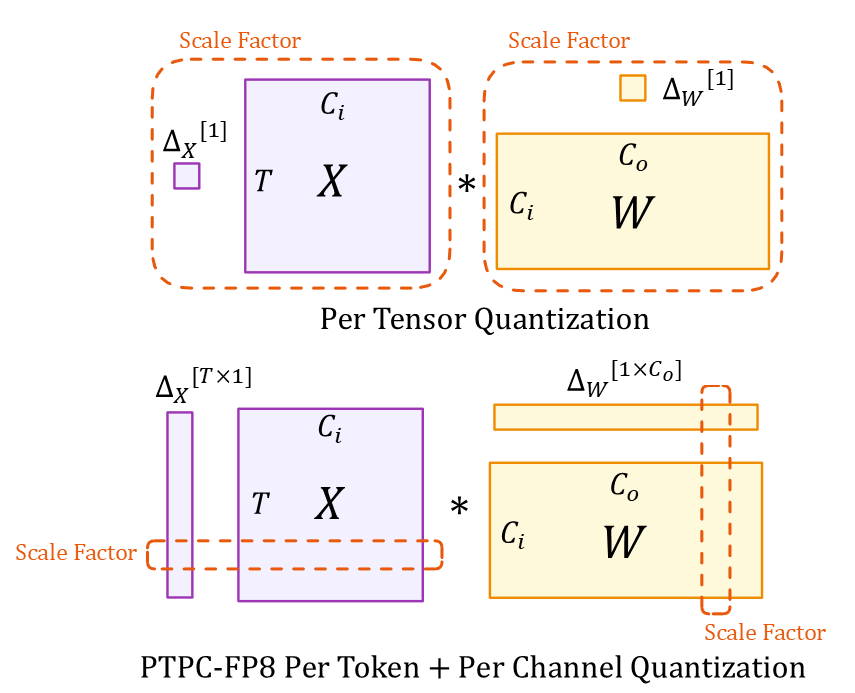
Understanding the Diagram
The illustration shows two quantization approaches:
Tensor Dimensions (Both Methods):
- $X$: Input activation tensor ($T \times C_i$)
- $W$: Weight tensor ($C_i \times C_o$)
- $T$: Token sequence length
- $C_i/C_o$: Input/output channels
- $*$: Matrix multiplication
Scaling Factors:
- Top (Per-Tensor): Single scalars $\Delta_X[1]$ and $\Delta_W[1]$ for entire tensors
- Bottom (PTPC): Vector $\Delta_X[T \times 1]$ with one scale per token and $\Delta_W[1 \times C_o]$ with one scale per input channel
This granular scaling approach allows PTPC-FP8 to achieve accuracy close to BF16 while maintaining the speed and memory benefits of 8-bit computation.
Deep Dive: How PTPC-FP8 Works in vLLM (and the Fused Kernel)
PTPC-FP8’s fine-grained scaling could slow things down without proper optimization. The key to maintaining speed is AMD ROCm’s implementation of a fused FP8 rowwise scaled GEMM operation.
The Challenge: 2-Step vs. Fused Approach
Without optimization, matrix multiplication with per-token and per-channel scaling would require two costly steps:
# Naive 2-step approach:
output = torch._scaled_mm(input, weight)       # Step 1: FP8 GEMM
output = output * token_scales * channel_scales  # Step 2: Apply scaling factors
This creates a performance bottleneck:
- Write large intermediate results to memory
- Read them back for scaling operations
- Waste memory bandwidth and compute cycles
The Solution: Fusion
The fused approach combines matrix multiplication and scaling into a single hardware operation:
# Optimized fused operation:
output = torch._scaled_mm(input, weight,
                         scale_a=token_scales,
                         scale_b=channel_scales)
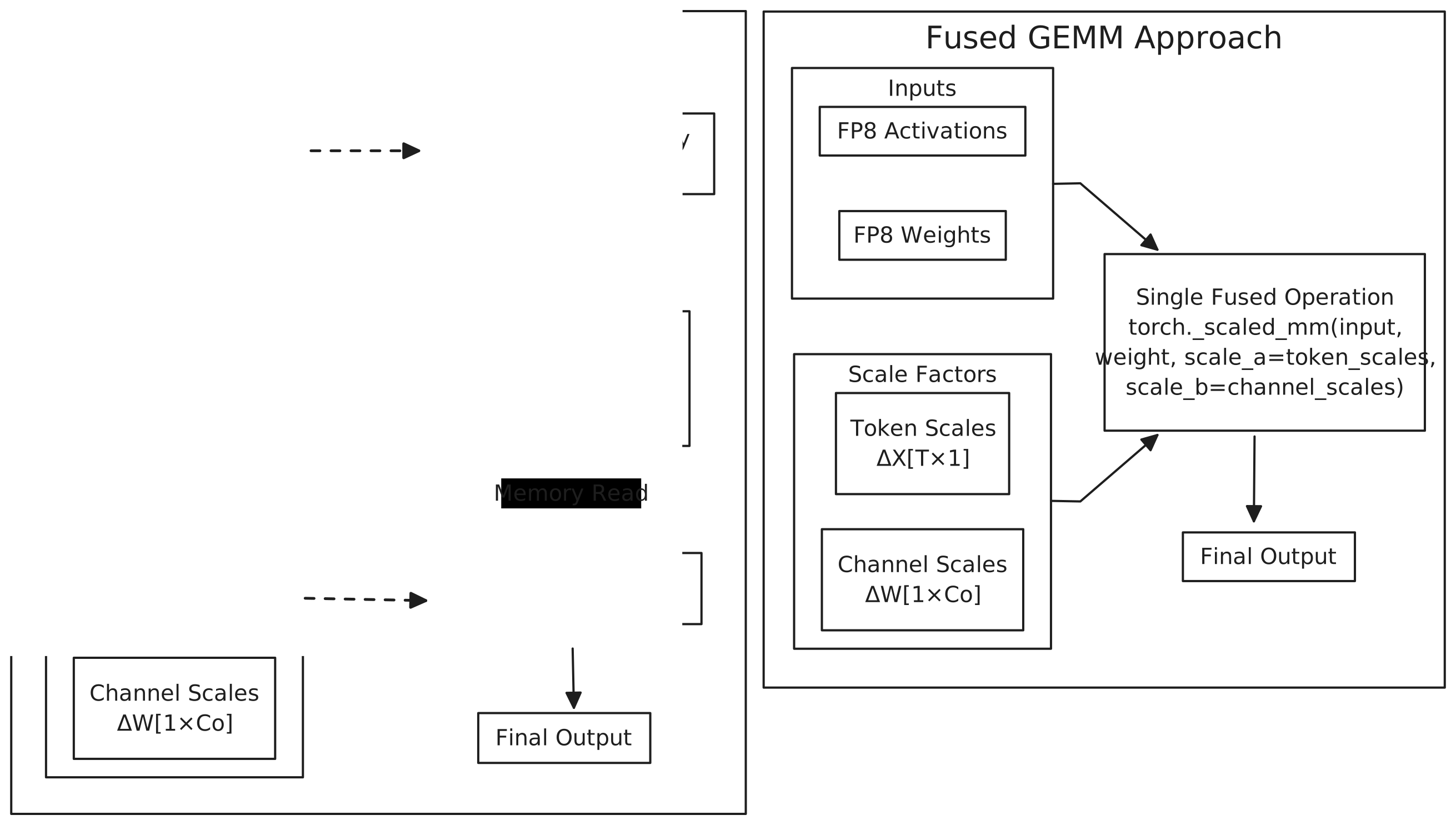
Why This Matters
This fusion leverages AMD GPUs’ specialized hardware (particularly on MI300X with native FP8 support):
- Memory Efficiency: Scaling happens within on-chip memory before writing results
- Computational Efficiency: Eliminates redundant operations
- Performance Boost: Our tests show up to 2.5× speedup compared to the naive implementation
The fused operation makes PTPC-FP8 practical for real-world deployment, eliminating the performance penalty of using more granular scaling factors while maintaining accuracy benefits.
Benchmarking PTPC-FP8: Speed and Accuracy on MI300X
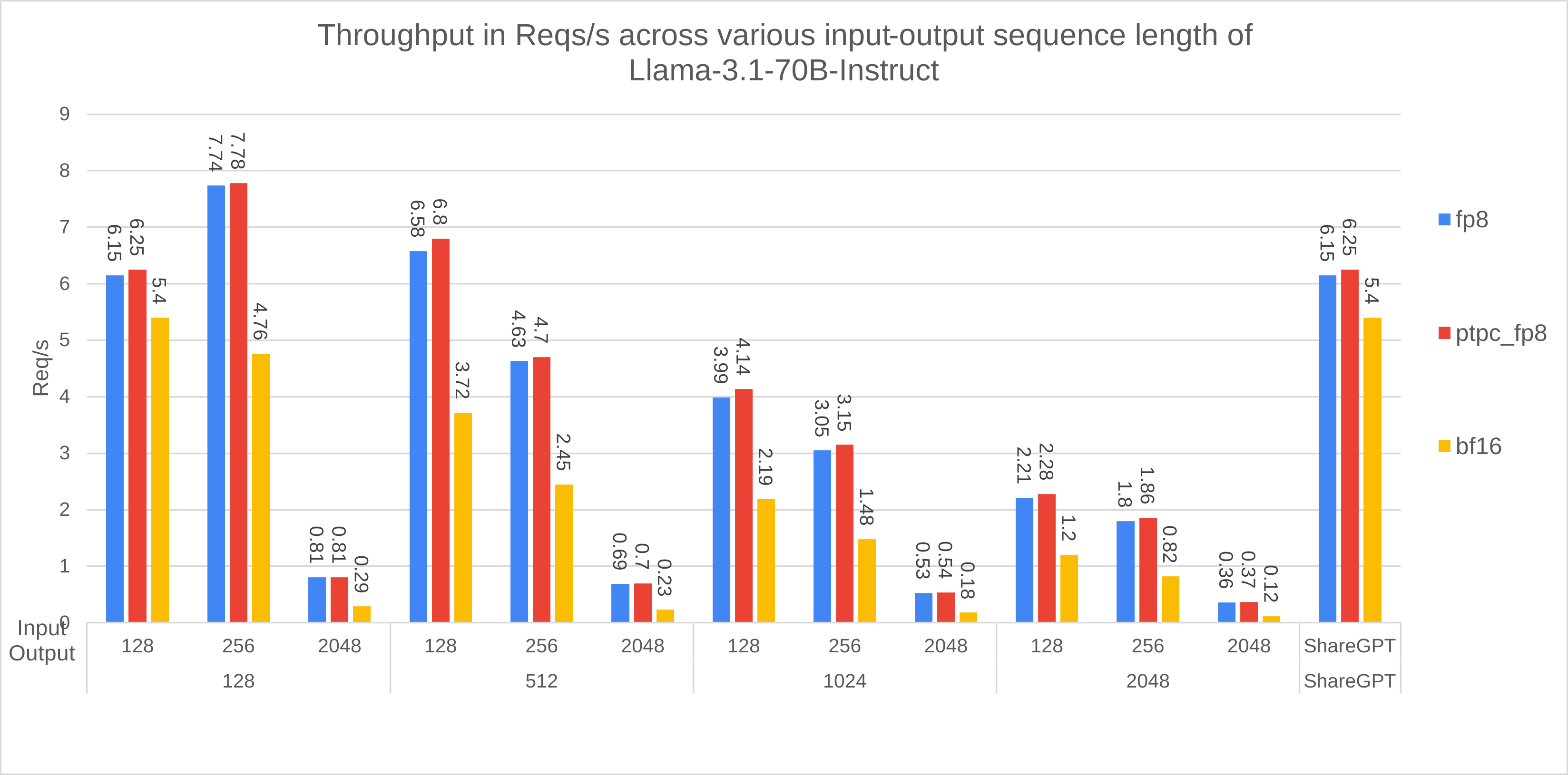
We extensively benchmarked PTPC-FP8 using vLLM on AMD MI300X GPUs (commit 4ea48fb35cf67d61a1c3f18e3981c362e1d8e26f). Here’s what we found:
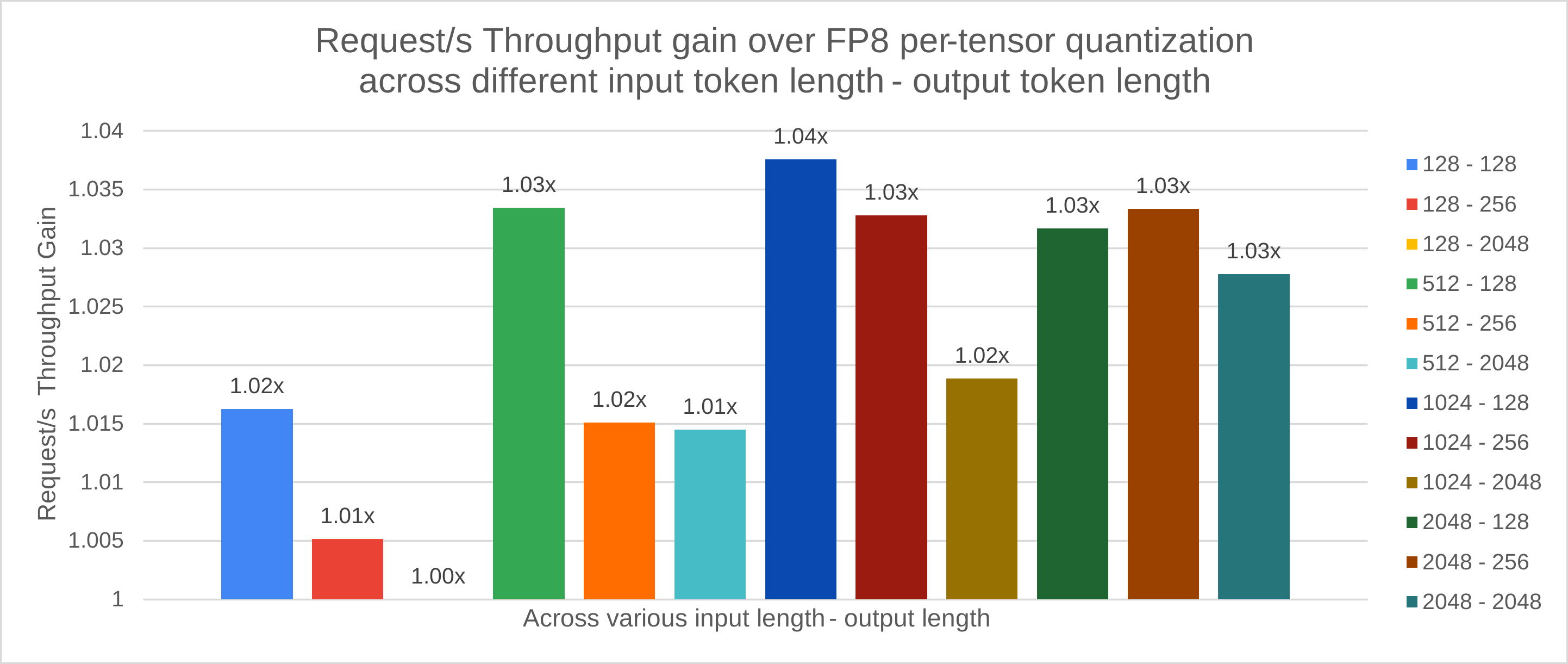
1. Throughput Comparison (PTPC-FP8 vs. Per-Tensor FP8):
- Model: Llama-3.1-70B-Instruct
- Dataset: SharedGPT
- GPU: 1x MI300X
- Result: PTPC-FP8 achieves virtually identical throughput to per-tensor FP8 (even slightly better – 1.01x improvement). This demonstrates that the fused kernel completely overcomes the potential overhead of PTPC-FP8’s more complex scaling.
2.1. Accuracy: Perplexity (Lower is Better)
- Model: Llama-3.1-8B-Instruct
- Dataset: Wikitext
- Setup: 2× MI300X GPUs with tensor parallelism
Understanding Perplexity: The Prediction Power Test
Think of perplexity as a measure of how “confused” the model is when predicting text. Like a student taking a quiz:
- Lower perplexity = Better predictions (the model confidently assigns high probability to the correct next words)
- Higher perplexity = More uncertainty (the model is frequently surprised by what comes next)
A small increase in perplexity (even 0.1) can indicate meaningful degradation in model quality, especially for large language models that have been extensively optimized.
Results: PTPC-FP8 Maintains BF16-Like Quality
| Precision | Word Perplexity | % Degradation |
|---|---|---|
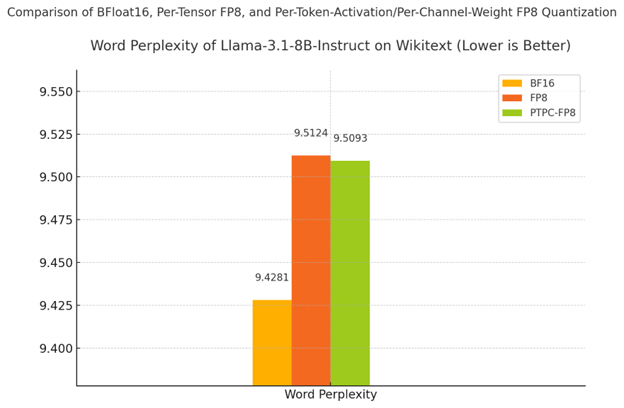
| BF16 (baseline) | 9.4281 | - |
| PTPC-FP8 | 9.5093 | 0.86% |
| Standard FP8 | 9.5124 | 0.89% |
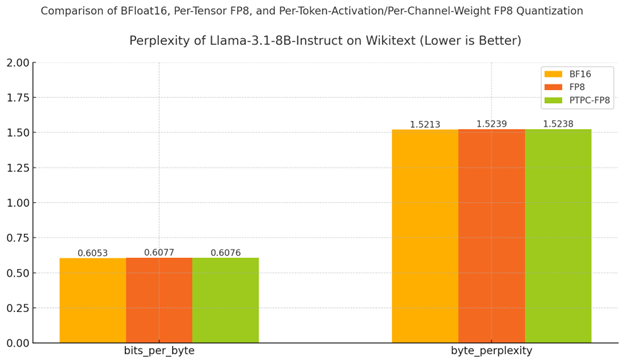
As shown in both the table and chart:
- PTPC-FP8 outperforms standard FP8 quantization (9.5093 vs 9.5124)
- The gap to BF16 is minimal - only 0.86% degradation from the full-precision baseline
- Byte-level metrics (bits_per_byte and byte_perplexity) show the same pattern of results
Why This Matters: While standard FP8 already provides decent results, PTPC-FP8’s lower perplexity indicates it better preserves the model’s ability to make accurate predictions. This is especially important for complex reasoning and generation tasks, where small quality drops can compound into noticeable differences in output quality.
2.2. Accuracy on GSM8K: Testing Mathematical Reasoning**
What is GSM8K and Why It Matters
GSM8K tests a model’s ability to solve grade school math word problems – one of the most challenging tasks for LLMs. Unlike simple text prediction, these problems require:
- Multi-step reasoning
- Numerical accuracy
- Logical consistency
This benchmark provides a strong indicator of whether quantization preserves a model’s reasoning abilities.
Understanding the Results
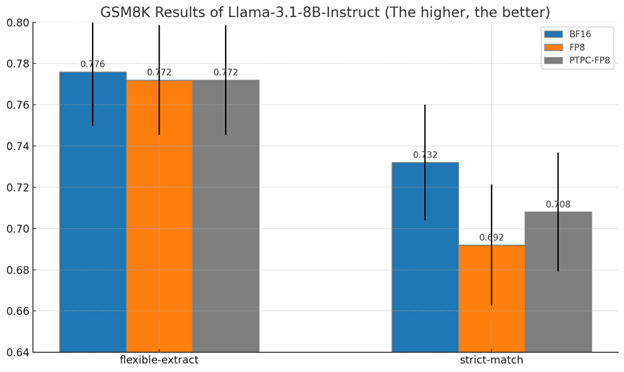
We measured accuracy using two methods:
- Flexible-extract: Accepts answers if the correct number appears anywhere in the response
- Strict-match: Requires the exact answer in the expected format
8B Model Results at a Glance:
| Method | Strict-match Accuracy | % of BF16 Performance |
|---|---|---|
| BF16 (baseline) | 73.2% | 100% |
| PTPC-FP8 | 70.8% | 96.7% |
| Standard FP8 | 69.2% | 94.5% |
70B Model Results:
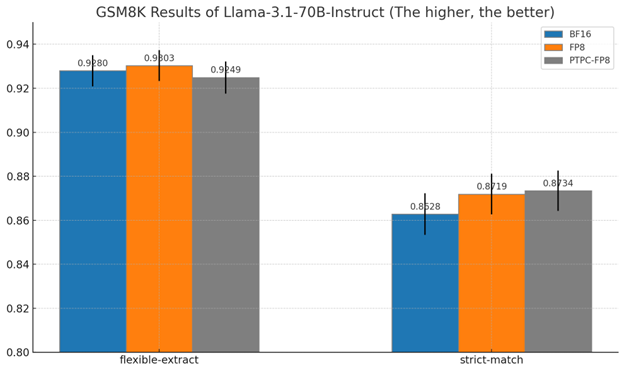
For the larger 70B model:
- PTPC-FP8 achieves 87.3% strict-match accuracy
- This is actually slightly better than BF16’s 86.3%
- Both outperform standard FP8 in strict-match conditions
Why These Results Matter
-
Preservation of reasoning abilities: Mathematical reasoning is often the first capability to degrade with quantization
-
PTPC-FP8 consistently outperforms standard FP8 across both model sizes
-
Near-BF16 quality with substantially reduced memory and improved performance
-
Scaling advantage: The performance gap between quantization methods narrows as model size increases, suggesting PTPC-FP8 is especially valuable for large models
These results demonstrate that PTPC-FP8 quantization preserves the model’s ability to perform complex reasoning tasks while delivering the speed and efficiency benefits of 8-bit precision.
Getting Started
- Install ROCm: Make sure you have a recent version.
- Clone the latest vLLM commit now! Setup and start exploring this new feature!
$ git clone https://github.com/vllm-project/vllm.git
$ cd vllm
$ DOCKER_BUILDKIT=1 docker build -f Dockerfile.rocm -t vllm-rocm .
$ docker run -it \
   --network=host \
   --group-add=video \
   --ipc=host \
   --cap-add=SYS_PTRACE \
   --security-opt seccomp=unconfined \
   --device /dev/kfd \
   --device /dev/dri \
   -v <path/to/model>:/app/model \
   vllm-rocm \
   bash
- Run vLLM with the
--quantization ptpc_fp8flag:
VLLM_USE_TRITON_FLASH_ATTN=0 vllm serve <your-model> --max-seq-len-to-capture 16384 --enable-chunked-prefill=False --num-scheduler-steps 15 --max-num-seqs 1024 --quantization ptpc_fp8
(Replace <your-model> with any hugging face model; It will automatically quantize the weight on-the-fly.)
Conclusion: The Accuracy-Speed Sweet Spot
PTPC-FP8 quantization in vLLM on AMD ROCm represents a significant step towards democratizing access to powerful LLMs. By making near-BF16 accuracy achievable at FP8 speeds, we’re breaking down the computational barriers that have limited wider adoption. This advancement empowers a broader community – from individual researchers to resource-constrained organizations – to leverage the power of large language models on accessible AMD hardware. We invite you to explore PTPC-FP8, share your experiences, contribute to the vLLM project, and help us build a future where efficient and accurate AI is available to everyone.
Appendix
lm-evaluation-harness Commands:
# Unquantized (Bfloat16)
MODEL=meta-llama/Llama-3.1-8B-Instruct
HIP_VISIBLE_DEVICES=0,1 lm_eval \
  --model vllm \
  --model_args pretrained=$MODEL,add_bos_token=True,tensor_parallel_size=2,kv_cache_dtype=auto,max_model_len=2048,gpu_memory_utilization=0.6 \
  --tasks wikitext --batch_size 16

# Per-Tensor FP8 Quantization
MODEL=meta-llama/Llama-3.1-8B-Instruct
HIP_VISIBLE_DEVICES=0,1 lm_eval \
  --model vllm \
  --model_args pretrained=$MODEL,add_bos_token=True,tensor_parallel_size=2,quantization=fp8,kv_cache_dtype=fp8_e4m3,max_model_len=2048,gpu_memory_utilization=0.6 \
  --tasks wikitext --batch_size 16

# Per-Token-Activation Per-Channel-Weight FP8 Quantization
MODEL=meta-llama/Llama-3.1-8B-Instruct
HIP_VISIBLE_DEVICES=0,1 lm_eval \
  --model vllm \
  --model_args pretrained=$MODEL,add_bos_token=True,tensor_parallel_size=2,quantization=ptpc_fp8,kv_cache_dtype=fp8_e4m3,max_model_len=2048,gpu_memory_utilization=0.6 \
  --tasks wikitext --batch_size 16
lm-evaluation-harness Commands (8B Model - adjust for 70B):
# FP8 (Per-Tensor)
MODEL=/app/model/Llama-3.1-8B-Instruct/  # Or Llama-3.1-70B-Instruct
lm_eval \
  --model vllm \
  --model_args pretrained=$MODEL,add_bos_token=True,quantization=fp8,kv_cache_dtype=fp8_e4m3 \
  --tasks gsm8k  --num_fewshot 5 --batch_size auto --limit 250

# PTPC FP8
MODEL=/app/model/Llama-3.1-8B-Instruct/  # Or Llama-3.1-70B-Instruct
lm_eval \
  --model vllm \
  --model_args pretrained=$MODEL,add_bos_token=True,quantization=ptpc_fp8,kv_cache_dtype=fp8_e4m3 \
  --tasks gsm8k  --num_fewshot 5 --batch_size auto --limit 250

# BF16
MODEL=/app/model/Llama-3.1-8B-Instruct/  # Or Llama-3.1-70B-Instruct
lm_eval \
  --model vllm \
  --model_args pretrained=$MODEL,add_bos_token=True,kv_cache_dtype=auto \
  --tasks gsm8k  --num_fewshot 5 --batch_size auto --limit 250